Screen & audio recording
Record the full screen, a single window or audio only, together with the microphone and system audio. Pause and resume as you go, and stop from anywhere with a global shortcut.
ScreenBrief records your meetings and screen, then turns them into a transcript, a summary, action items and a chat. Every answer is backed by a quote pointing to the exact minute of the recording. Your recordings and data stay on your disk. The download is free and Pro is a single purchase, with no subscription.
See ScreenBrief in action
See the transcript, summary and answers that point to the exact minute of your recording.
Music I Use: Bensound.com/royalty-free-music
Artist: Benjamin Tissot · License code: AS9JFYESEFRFIBFB
The app in action
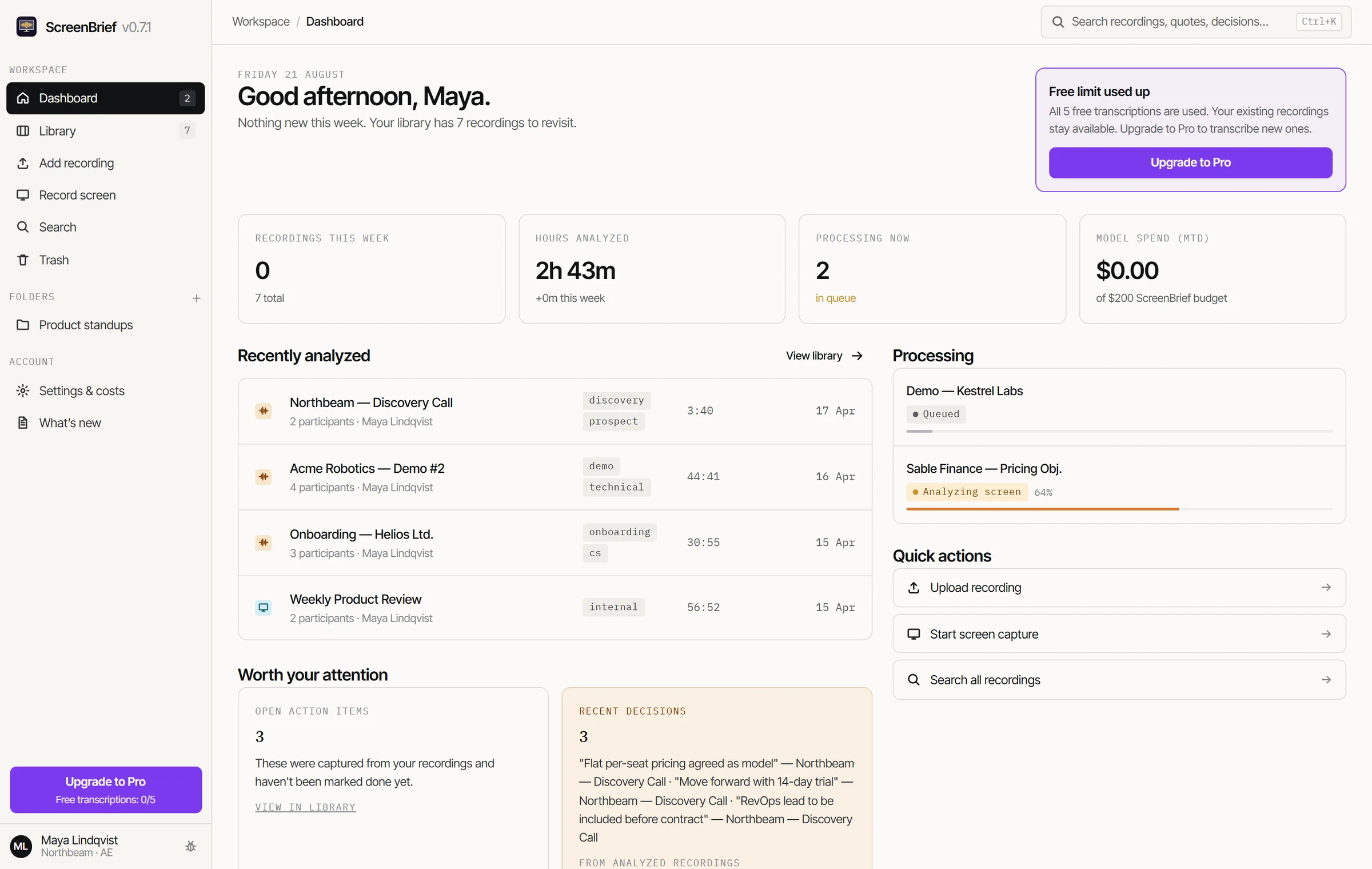
You see the whole week on one screen: the key numbers, recordings being processed, open action items and the latest decisions.
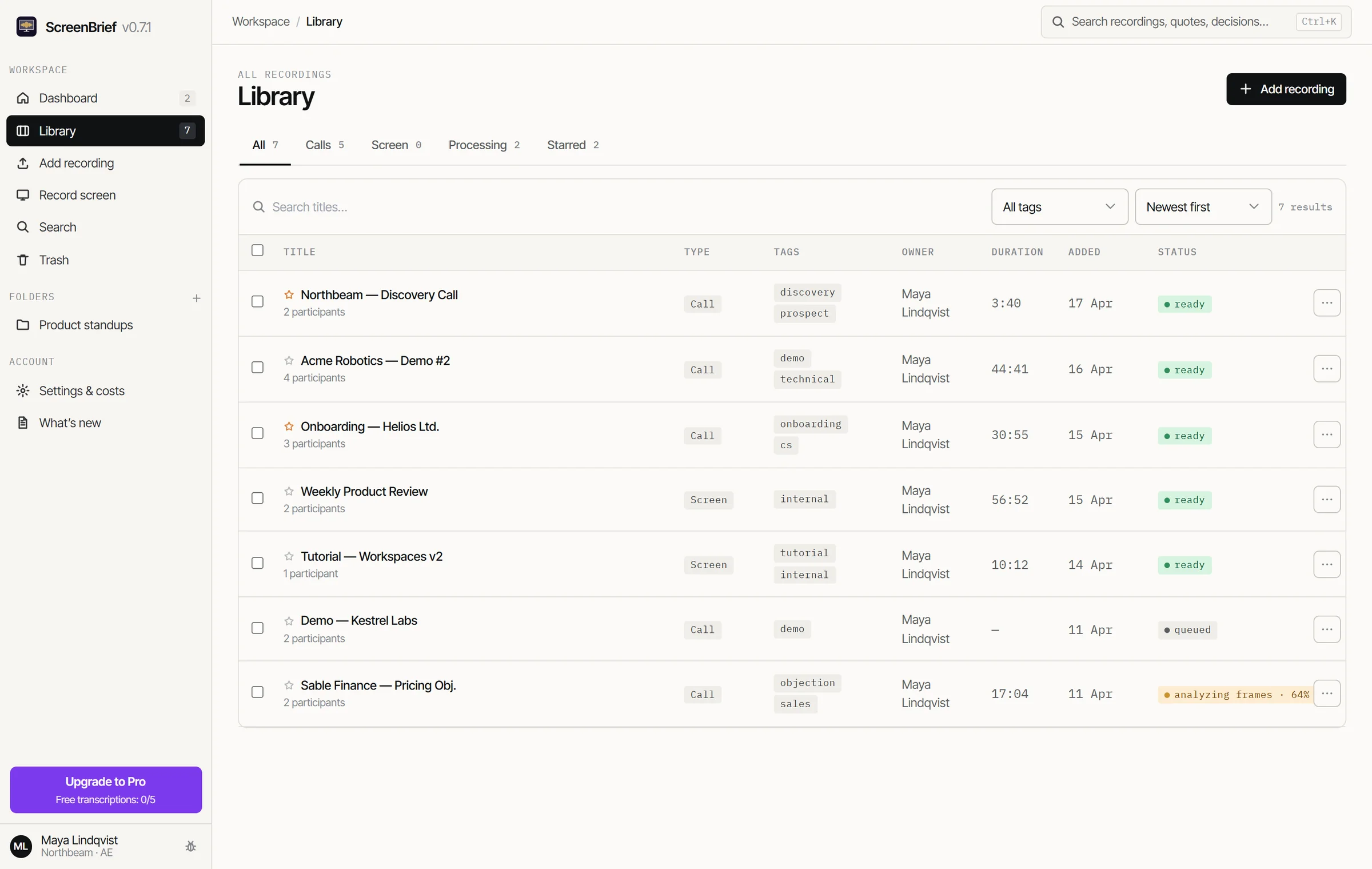
You keep recordings in order with filters (calls, screens, processing, starred), tags, participants and statuses, with no manual housekeeping.
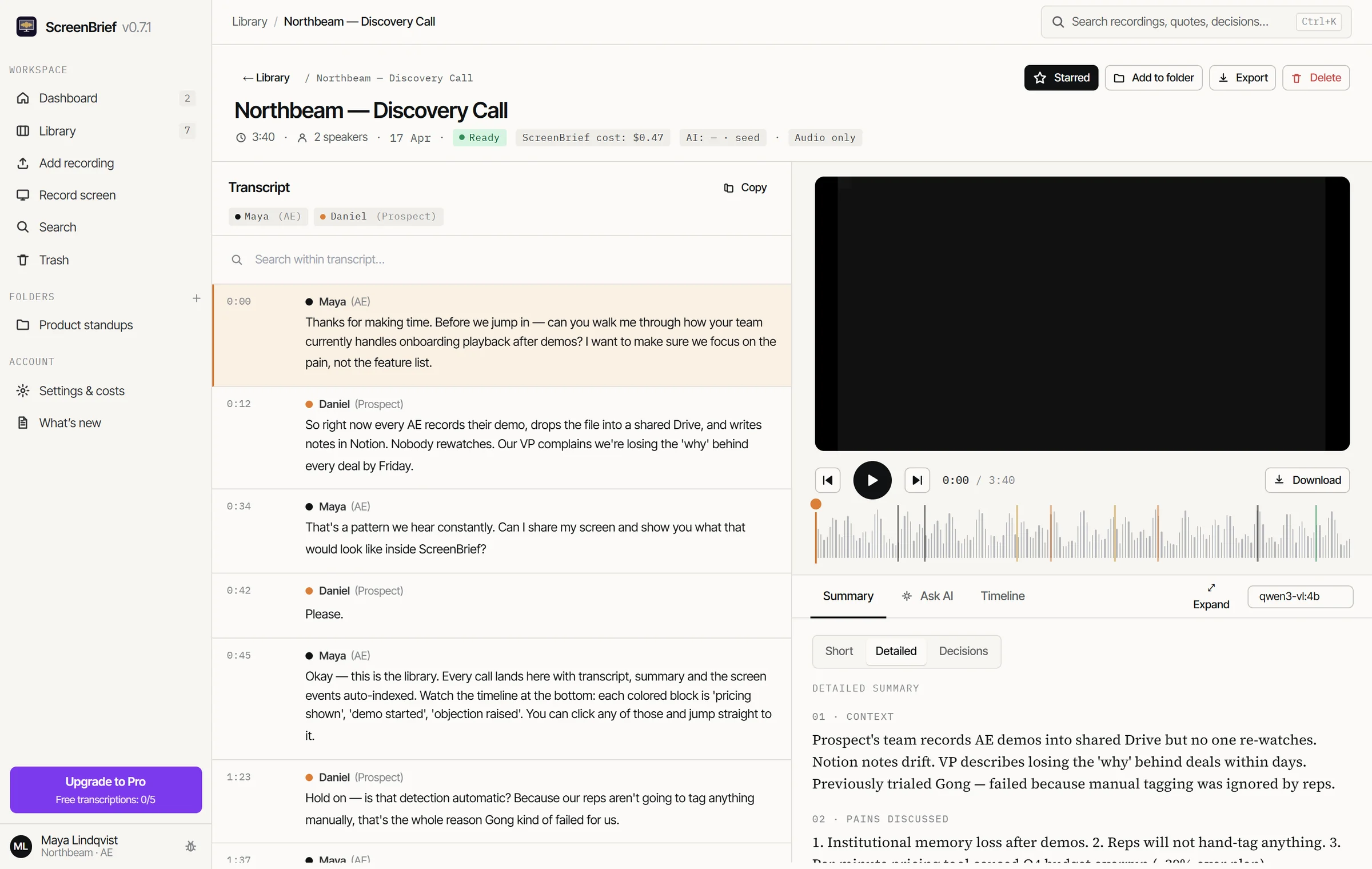
Next to the player you get a speaker-labelled transcript, short and detailed summaries, action items with due dates and the decision log.
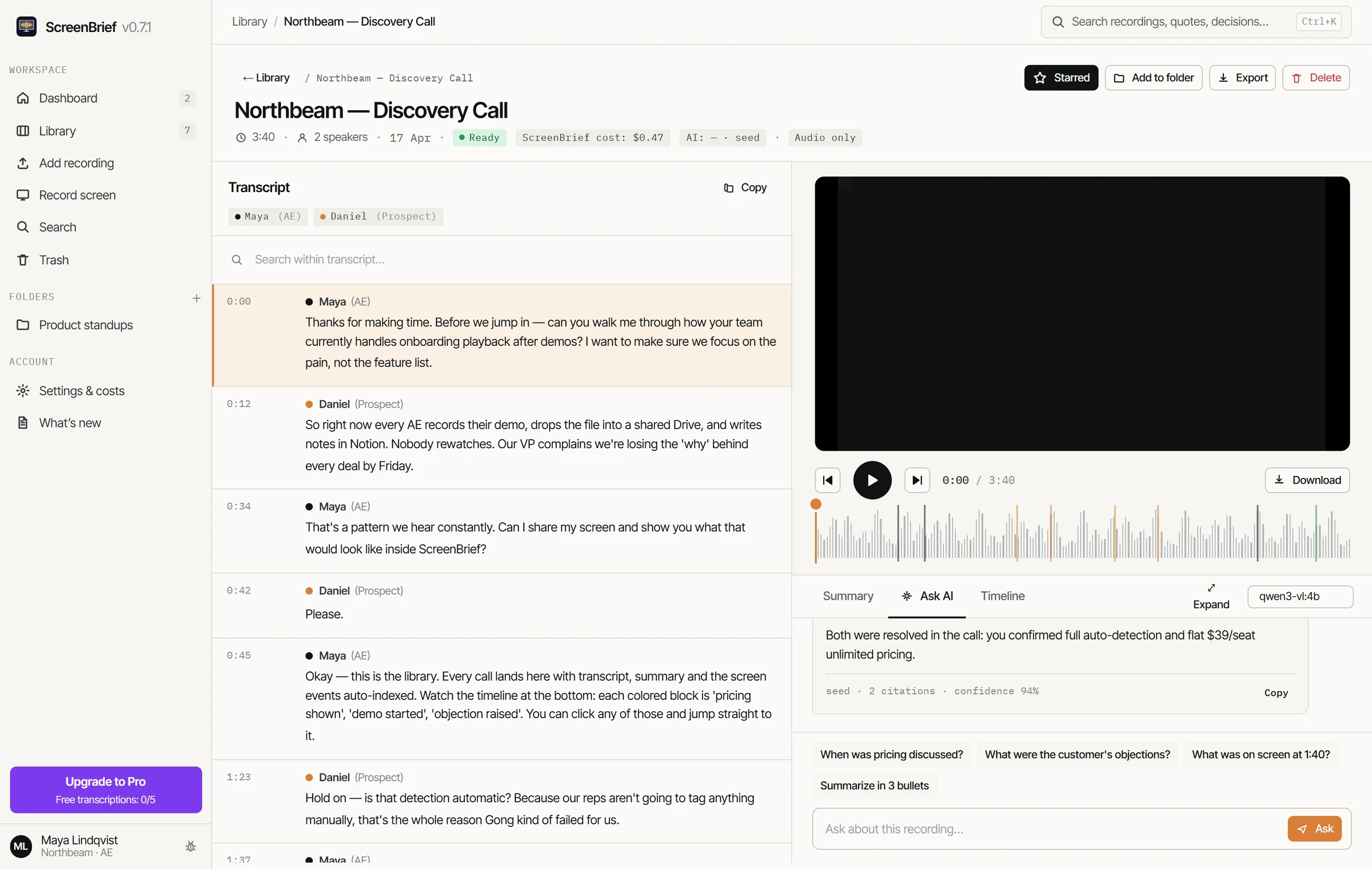
The chat answers only from the recording and backs every claim with a quote pointing to the minute.
You search all recordings at once: utterances, screen events and decisions. Every result takes you to the exact second.
Features
Record the full screen, a single window or audio only, together with the microphone and system audio. Pause and resume as you go, and stop from anywhere with a global shortcut.
Drop recordings from Zoom, Teams or a voice recorder (mp4, mov, mkv, webm, mp3, wav and more), add them without copying, or paste a link to a file.
Transcribe locally with Whisper (on the CPU or GPU, with three model sizes) or through an external provider: OpenAI, Groq, Deepgram, AssemblyAI.
ScreenBrief splits the conversation into speakers on its own and assigns them the real names spoken in the call. Names and the transcript can be corrected by hand.
You get short and detailed summaries, tasks with an owner and a due date, and decisions stamped with the minute they were made. Regenerate any of it with your own prompt.
The timeline splits a recording into lanes: speakers, screen activity, pricing threads, objections and decisions. No more scrubbing blind.
Turn on frame analysis and the text visible on screen becomes events and lands in search.
Ask about one recording or a whole folder, such as every meeting with one client. Every answer arrives with a quote and the minute.
One search box covers utterances, screen events and decisions across all recordings. A result takes you to the exact second.
Export a recording to Markdown, SRT, VTT and PDF, and action items to your calendar (ICS). Copy the transcript, summary and chat answers in one click.
A monthly dollar cap is checked before every AI call. You see costs split across transcription, summaries and chat, and can assign a different model to each task.
The interface runs in Polish and English. Transcription handles about 100 languages with auto-detection, and the AI output language is set separately.
Ask AI
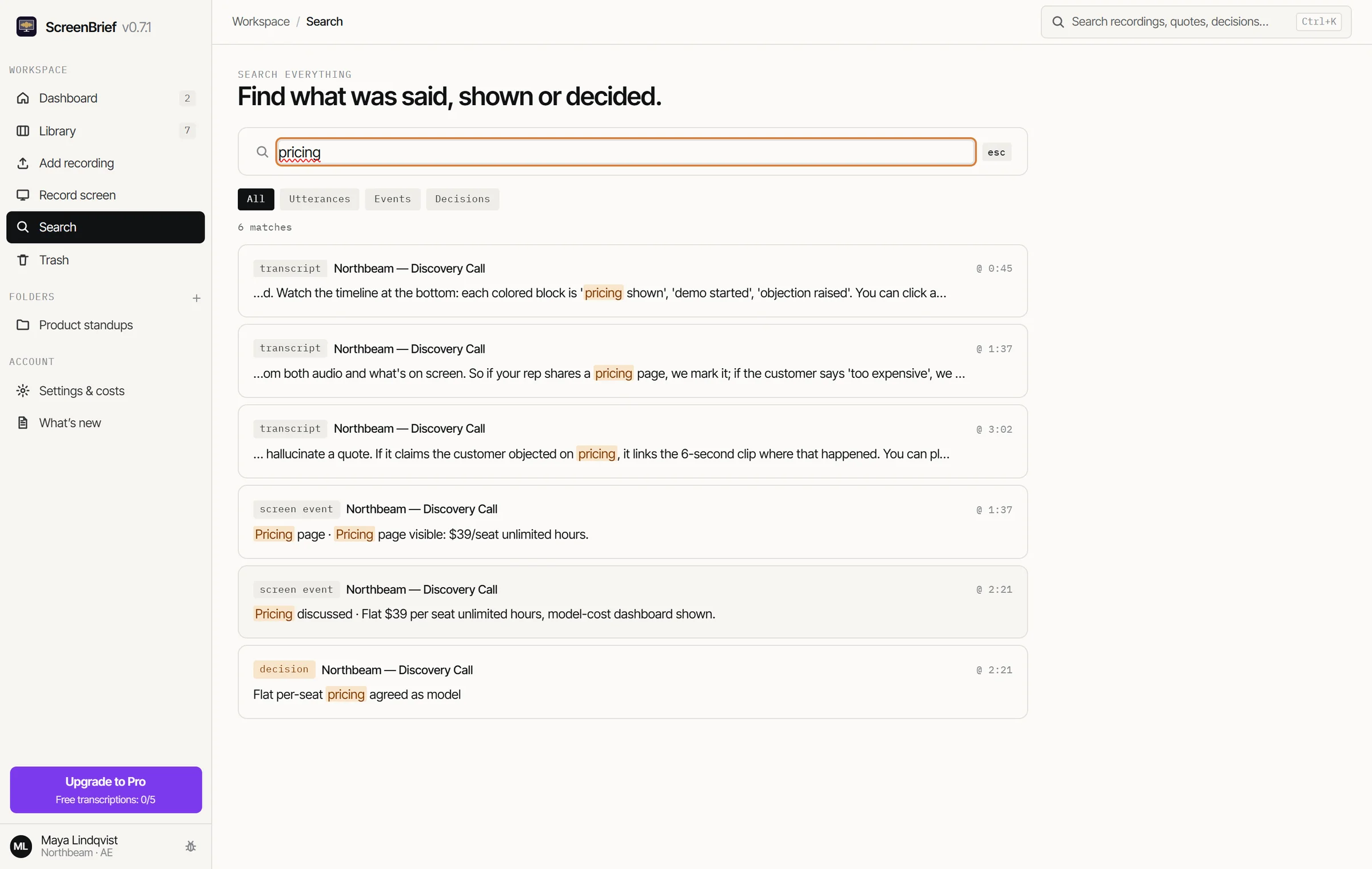
Search
Privacy
ScreenBrief is a local app, not a cloud service. No accounts, no syncing, no “analytics”. Only what you choose to send reaches the AI models, through your own keys.
How it works in practice: transcription where the recording never leaves your computer →
Guides
Focused answers about local transcription, AI meeting notes, and screen recordings on Windows.
What really stays on your computer and when data can reach an external model.
Read the guide → 02A workflow without a bot joining the call or another monthly subscription.
Read the guide → 03Connect spoken words, screen context, summaries, and the exact point on the timeline.
Read the guide →FAQ
No. The app is a free download and you unlock Pro with a single in-app purchase of 299 PLN. There are no monthly fees, no plans and no credits to top up.
Yes. The first 5 transcriptions are free. Pick local Whisper and they need no API key at all. Once that allowance is used up your existing recordings and transcripts stay available, and buying Pro in the app unlocks new transcriptions.
One. A Pro license is signed for a specific installation, so a second computer needs its own. After a reinstall on the same computer it comes back by itself. The license renews over the internet roughly once a month, and between renewals ScreenBrief works offline.
Locally: a SQLite database and recording files in your user directory. ScreenBrief never uploads recordings or transcripts to any vendor server. If you point it at an external AI provider yourself, that provider receives (under your own key) the audio for API transcription, or excerpts of the transcript for summaries and chat. With local Whisper and local Ollama, nothing leaves your computer.
The longer answer: what stays on disk, and what still leaves →
Not for transcription: local Whisper runs without any key. Summaries and chat do need an AI provider, so either your own key (Anthropic or OpenAI, for example) or local Ollama, which needs no key either. Spending is guarded by a hard cap you set yourself.
No. Local transcription runs on the CPU alone, and if you have a graphics card ScreenBrief can use it through built-in Vulkan or optional CUDA for NVIDIA cards. On weaker hardware you pick a smaller model, and you can move transcription entirely to an external provider via API so your machine does none of the work.
Interface: Polish and English. Transcription: about 100 languages with auto-detection. The summary and AI answer language is set separately, so you can record in Polish and get the brief in English.
ScreenBrief is currently available for Windows 10 and Windows 11 (x64) in Microsoft Store. You can purchase Pro later inside the app with a one-time payment.
License
The app is a free download and comes with 5 transcriptions. You unlock Pro from inside the app, with a single purchase and no subscription.
ScreenBrief · ArtFlow Management